

这篇文章的想法是该系列文章的第一篇,目的是演示如何编写一个Spring Boot Restful Web Service,该Web Service以被动方式访问远程API。 我的意图是总是使用反应性范例来添加更多功能,例如缓存和数据库。 在第一个例子中,我将描述如何从零开始到拥有功能完善的Web服务。
Getting Started
I based this on the Spring tutorial Building a Reactive RESTful Web Service, and build it from the scratch, copying only the initial Gradle build file. The project structure is as this following image.
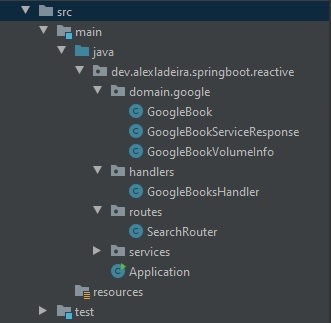
我创建了一个默认的Spring Boot Application类,唯一的区别是@ConponentScan指向应用程序基本包的注释。
package dev.alexladeira.springboot.reactive;

import org.springframework.boot.SpringApplication;
import org.springframework.boot.autoconfigure.SpringBootApplication;
import org.springframework.context.annotation.ComponentScan;

@SpringBootApplication
@ComponentScan(basePackages = {"dev.alexladeira.springboot.reactive"})
public class Application {
    public static void main(String[] args) {
        SpringApplication.run(Application.class, args);
    }
}
现在游戏开始了!
Writing the Router class
考虑到Router类,我放置了要公开的路由,这是一个简单的类,可在我公开的服务和为处理请求而创建的处理程序之间建立链接。
package dev.alexladeira.springboot.reactive.routes;

import dev.alexladeira.springboot.reactive.handlers.GoogleBooksHandler;
import org.springframework.context.annotation.Bean;
import org.springframework.context.annotation.ComponentScan;
import org.springframework.context.annotation.Configuration;
import org.springframework.web.reactive.function.server.RequestPredicates;
import org.springframework.web.reactive.function.server.RouterFunction;
import org.springframework.web.reactive.function.server.RouterFunctions;
import org.springframework.web.reactive.function.server.ServerResponse;

@Configuration
@ComponentScan({"handlers"})
public class SearchRouter {
    @Bean
    public RouterFunction<ServerResponse> search(GoogleBooksHandler googleBooksHandler) {
        return RouterFunctions.route(RequestPredicates.GET("/search"), googleBooksHandler::search);
    }
}
Until now I did not need to use Spring Reactor, this changed when I wrote the handler.
Writing the Handler and The Service classes
I created the handler to handle the request, call the external resource and create a response. Here I got the searchTerm from the request object and pass it to the service that is responsible for returning some information about the books that has the word that I passed as a parameter, in this example I was using the Google Books AP一世.
package dev.alexladeira.springboot.reactive.handlers;

import dev.alexladeira.springboot.reactive.domain.google.GoogleBook;
import org.springframework.beans.factory.annotation.Autowired;
import org.springframework.context.annotation.ComponentScan;
import org.springframework.stereotype.Component;
import org.springframework.web.reactive.function.BodyInserters;
import org.springframework.web.reactive.function.server.ServerRequest;
import org.springframework.web.reactive.function.server.ServerResponse;
import reactor.core.publisher.Mono;
import dev.alexladeira.springboot.reactive.services.GoogleBooksService;

import java.util.ArrayList;
import java.util.List;

@Component
@ComponentScan({"services"})
public class GoogleBooksHandler {

    @Autowired
    private GoogleBooksService googleBooksService;

    public Mono<ServerResponse> search(ServerRequest request) {
        String searchTerm = request.queryParam("searchTerm").orElse(null);
        return searchTerm != null ? ServerResponse.ok().body(BodyInserters.fromPublisher(this.googleBooksService.getBooksBy(searchTerm).reduce(new ArrayList<GoogleBook>(), (list, googleBookServiceResponse) -> {
            list.addAll(googleBookServiceResponse.items);
            return list;
        }), List.class)) : ServerResponse.badRequest().build();
    }
}
搜索方法的工作就是从Google图书API中获取图书,然后将其缩小为Google图书类型,一个仅包含我要服务返回的信息的Java类,然后创建响应。 如果服务接收到空调用(没有任何参数),则将引发错误。
服务类如下,通过网络客户端宾语
package dev.alexladeira.springboot.reactive.services;

import dev.alexladeira.springboot.reactive.domain.google.GoogleBookServiceResponse;
import org.springframework.stereotype.Service;
import org.springframework.web.reactive.function.client.WebClient;
import reactor.core.publisher.Flux;

@Service
public class GoogleBooksService implements GenericService<GoogleBookServiceResponse> {
    private WebClient webClient = WebClient.builder().baseUrl("https://content.googleapis.com").build();

    @Override
    public Flux<GoogleBookServiceResponse> getBooksBy(String searchTerm) {
        return this.webClient.get().uri(uriBuilder -> uriBuilder
                .path("/books/v1/volumes")
                .queryParam("q", searchTerm)
                .queryParam("maxResults", MAX_RESULTS)
                .build()).retrieve().bodyToFlux(GoogleBookServiceResponse.class).timeout(TIMEOUT);
    }
}
本课延伸通用服务,该类旨在集中一些信息,这些信息将由我将来使用的其他服务(常量MAX_RESULTS和TIMEOUT)使用。
Conclusion... for now
It's time start the server and see the results, point your browser to http://localhost:8080, if everything went well, you will see this:
[{"volumeInfo":{"title":"Learning Spring Boot 2.0","authors":["Greg L. Turnquist"],"printType":"BOOK"}},{"volumeInfo":{"title":"Spring Boot 2.0 Projects","authors":["Mohamed Shazin Sadak
ath"],"printType":"BOOK"}},{"volumeInfo":{"title":"Spring: Microservices with Spring Boot","authors":["Ranga Rao Karanam"],"printType":"BOOK"}},{"volumeInfo":{"title":"Pro Spring Boot","
authors":["Felipe Gutierrez"],"printType":"BOOK"}},{"volumeInfo":{"title":"Mastering Spring Boot 2.0","authors":["Dinesh Rajput"],"printType":"BOOK"}}]
The source code is at github.com/alexladeira/gs-reactive-rest-service. I will follow this post with others, always trying to show what I've being learning in SpringBoot topic.
 转播
转播


