Hadoop之HDFS的FileSystem接口详解(转)

论坛 期权论坛 编程之家     
选择匿名的用户   2021-5-29 09:59   449   0

转载:http://blog.51cto.com/jaydenwang/1842908

hadoop2.8.0的API:http://hadoop.apache.org/docs/r2.8.0/api/overview-summary.html

基本的文件系统命令操作, 通过hadoop fs-help可以获取所有的命令的详细帮助文件。

Java抽象类org.apache.hadoop.fs.FileSystem定义了hadoop的一个文件系统接口。Hadoop中关于文件操作类基本上全部是在"org.apache.hadoop.fs"包中,这些API能够支持的操作包含:打开文件,读写文件,删除文件等。

Hadoop类库中最终面向用户提供的接口类是FileSystem,该类是个抽象类,只能通过来类的get方法得到具体类。

构造方法

该类是一个抽象类,通过以下两种静态工厂方法可以过去FileSystem实例:

public staticFileSystem.get(Configuration conf) throws IOException

public staticFileSystem.get(URI uri, Configuration conf) throws IOException

补充一种:

public static FileSystem get(URI uri,
             Configuration conf,
             String user)
                      throws IOException,
                             InterruptedException

具体方法实现

1、publicboolean mkdirs(Path f) throws IOException

一次性新建所有目录(包括父目录), f是完整的目录路径。

2、publicFSOutputStream create(Path f) throws IOException

创建指定path对象的一个文件,返回一个用于写入数据的输出流

create()有多个重载版本,允许我们指定是否强制覆盖已有的文件、文件备份数量、写入文件缓冲区大小、文件块大小以及文件权限。

3、publicboolean copyFromLocal(Path src, Path dst) throws IOException

将本地文件拷贝到文件系统

4、publicboolean exists(Path f) throws IOException

检查文件或目录是否存在

5、publicboolean delete(Path f, Boolean recursive)

永久性删除指定的文件或目录,如果f是一个空目录或者文件,那么recursive的值就会被忽略。只有recursive=true时,一个非空目录及其内容才会被删除。

6、FileStatus类封装了文件系统中文件和目录的元数据,包括文件长度、块大小、备份、修改时间、所有者以及权限信息。

通过"FileStatus.getPath()"可查看指定HDFS中某个目录下所有文件。

1

2

3

4

5

6

7

8

9

10

11

12

13

14

15

16

17

18

19

20

21

22

23

24

25

26

27

28

29

30

31

32

33

34

35

36

37

38

39

40

41

42

43

44

45

46

47

48

49

50

51

52

53

54

55

56

57

58

59

60

61

62

63

64

65

66

67

68

69

70

71

72

73

74

75

76

77

78

79

80

81

82

83

84

85

86

87

88

89

90

packagehdfsTest;

importjava.io.IOException;

importorg.apache.hadoop.conf.Configuration;

importorg.apache.hadoop.fs.FSDataOutputStream;

importorg.apache.hadoop.fs.FileStatus;

importorg.apache.hadoop.fs.FileSystem;

importorg.apache.hadoop.fs.Path;

public classOperatingFiles {

//initialization

static Configuration conf = newConfiguration();

static FileSystem hdfs;

static {

String path ="/usr/java/hadoop-1.0.3/conf/";

conf.addResource(newPath(path + "core-site.xml"));

conf.addResource(newPath(path + "hdfs-site.xml"));

conf.addResource(newPath(path + "mapred-site.xml"));

path ="/usr/java/hbase-0.90.3/conf/";

conf.addResource(newPath(path + "hbase-site.xml"));

try {

hdfs =FileSystem.get(conf);

} catch (IOException e) {

e.printStackTrace();

}

}

//create a direction

public void createDir(String dir)throws IOException {

Path path = new Path(dir);

hdfs.mkdirs(path);

System.out.println("newdir \t" + conf.get("fs.default.name") + dir);

}

//copy from local file to HDFS file

public void copyFile(String localSrc,String hdfsDst) throws IOException{

Path src = newPath(localSrc);

Path dst = new Path(hdfsDst);

hdfs.copyFromLocalFile(src,dst);

//list all the files in thecurrent direction

FileStatus files[] =hdfs.listStatus(dst);

System.out.println("Uploadto \t" + conf.get("fs.default.name") + hdfsDst);

for (FileStatus file : files){

System.out.println(file.getPath());

}

}

//create a new file

public void createFile(String fileName,String fileContent) throws IOException {

Path dst = newPath(fileName);

byte[] bytes =fileContent.getBytes();

FSDataOutputStream output =hdfs.create(dst);

output.write(bytes);

System.out.println("newfile \t" + conf.get("fs.default.name") + fileName);

}

//list all files

public void listFiles(String dirName)throws IOException {

Path f = new Path(dirName);

FileStatus[] status =hdfs.listStatus(f);

System.out.println(dirName +" has all files:");

for (int i = 0; i<status.length; i++) {

System.out.println(status[i].getPath().toString());

}

}

//judge a file existed? and delete it!

public void deleteFile(String fileName)throws IOException {

Path f = new Path(fileName);

boolean isExists =hdfs.exists(f);

if (isExists) { //if exists, delete

boolean isDel =hdfs.delete(f,true);

System.out.println(fileName+ " delete? \t" + isDel);

} else {

System.out.println(fileName+ " exist? \t" + isExists);

}

}

public static void main(String[] args)throws IOException {

OperatingFiles ofs = newOperatingFiles();

System.out.println("\n=======createdir=======");

String dir ="/test";

ofs.createDir(dir);

System.out.println("\n=======copyfile=======");

String src ="/home/ictclas/Configure.xml";

ofs.copyFile(src, dir);

System.out.println("\n=======createa file=======");

String fileContent ="Hello, world! Just a test.";

ofs.createFile(dir+"/word.txt",fileContent);

}

}

上传本地文件

通过"FileSystem.copyFromLocalFile(Path src,Patch dst)"可将本地文件上传到HDFS的制定位置上,其中src和dst均为文件的完整路径。具体事例如下:

1

2

3

4

5

6

7

8

9

10

11

12

13

14

15

16

17

18

19

20

21

22

23

24

25

26

packagecom.hebut.file;

importorg.apache.hadoop.conf.Configuration;

importorg.apache.hadoop.fs.FileStatus;

importorg.apache.hadoop.fs.FileSystem;

importorg.apache.hadoop.fs.Path;

public classCopyFile {

public static void main(String[] args)throws Exception {

Configuration conf=new Configuration();

FileSystem hdfs=FileSystem.get(conf);

//本地文件

Path src =newPath("D:\\HebutWinOS");

//HDFS为止

Path dst =new Path("/");

hdfs.copyFromLocalFile(src, dst);

System.out.println("Uploadto"+conf.get("fs.default.name"));

FileStatusfiles[]=hdfs.listStatus(dst);

for(FileStatus file:files){

System.out.println(file.getPath());

}

}

}

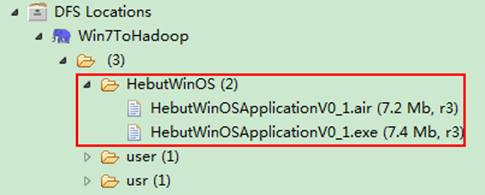
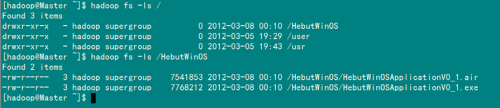
运行结果可以通过控制台、项目浏览器和Linux查看,如图所示。

1、控制台结果

wKiom1e_vAODPt6FAAEI1_73W4E026.png-wh_50

2、项目浏览器

wKioL1e_vAyDiv4TAAC904IKKdM707.png-wh_50

3、linux结果详情

wKioL1e_vCCjGJVxAAGOHLMx0Xs810.png-wh_50

创建HDFS文件

通过"FileSystem.create(Path f)"可在HDFS上创建文件,其中f为文件的完整路径。具体实现如下:

1

2

3

4

5

6

7

8

9

10

11

12

13

14

15

16

17

18

19

20

21

22

package com.hebut.file;

import org.apache.hadoop.conf.Configuration;

import org.apache.hadoop.fs.FSDataOutputStream;

import org.apache.hadoop.fs.FileSystem;

import org.apache.hadoop.fs.Path;

public class CreateFile {

public static void main(String[] args) throws Exception {

Configuration conf=new Configuration();

FileSystem hdfs=FileSystem.get(conf);

byte[] buff="hello hadoop world!\n".getBytes();

Path dfs=new Path("/test");

FSDataOutputStream outputStream=hdfs.create(dfs);

outputStream.write(buff,0,buff.length);

}

}

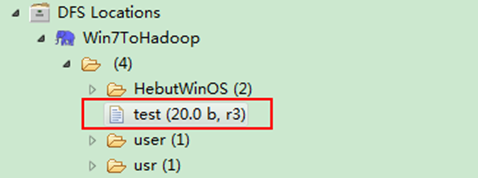
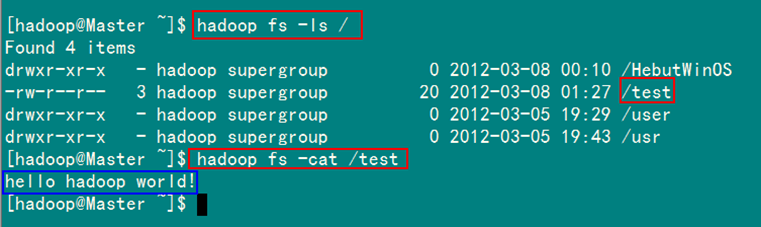
运行结果如图所示。

1)项目浏览器

HDFS API详解

2)Linux结果

HDFS API详解

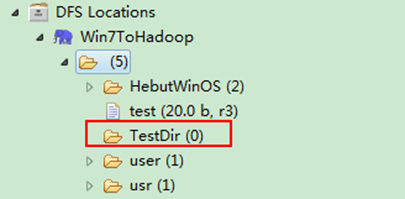
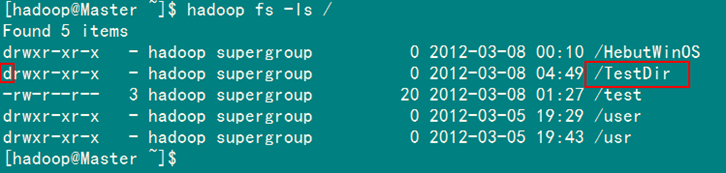
创建HDFS目录

通过"FileSystem.mkdirs(Path f)"可在HDFS上创建文件夹,其中f为文件夹的完整路径。具体实现如下:

1

2

3

4

5

6

7

8

9

10

11

12

13

14

15

16

17

18

package com.hebut.dir;

import org.apache.hadoop.conf.Configuration;

import org.apache.hadoop.fs.FileSystem;

import org.apache.hadoop.fs.Path;

public class CreateDir {

public static void main(String[] args) throws Exception{

Configuration conf=new Configuration();

FileSystem hdfs=FileSystem.get(conf);

Path dfs=new Path("/TestDir");

hdfs.mkdirs(dfs);

}

}

运行结果如图所示。

1)项目浏览器

HDFS API详解

2)Linux结果

HDFS API详解

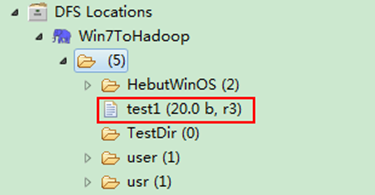
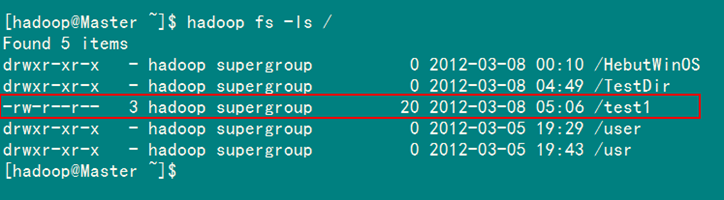
重命名HDFS文件

通过"FileSystem.rename(Path src,Path dst)"可为指定的HDFS文件重命名,其中src和dst均为文件的完整路径。具体实现如下:

1

2

3

4

5

6

7

8

9

10

11

12

13

14

15

16

17

18

19

20

21

package com.hebut.file;

import org.apache.hadoop.conf.Configuration;

import org.apache.hadoop.fs.FileSystem;

import org.apache.hadoop.fs.Path;

public class Rename{

public static void main(String[] args) throws Exception {

Configuration conf=new Configuration();

FileSystem hdfs=FileSystem.get(conf);

Path frpaht=new Path("/test"); //旧的文件名

Path topath=new Path("/test1"); //新的文件名

boolean isRename=hdfs.rename(frpaht, topath);

String result=isRename?"成功":"失败";

System.out.println("文件重命名结果为:"+result);

}

}

运行结果如图所示。

1)项目浏览器

HDFS API详解

2)Linux结果 HDFS API详解

删除HDFS上的文件

通过"FileSystem.delete(Path f,Boolean recursive)"可删除指定的HDFS文件,其中f为需要删除文件的完整路径,recuresive用来确定是否进行递归删除。具体实现如下:

1

2

3

4

5

6

7

8

9

10

11

12

13

14

15

16

17

18

19

20

package com.hebut.file;

import org.apache.hadoop.conf.Configuration;

import org.apache.hadoop.fs.FileSystem;

import org.apache.hadoop.fs.Path;

public class DeleteFile {

public static void main(String[] args) throws Exception {

Configuration conf=new Configuration();

FileSystem hdfs=FileSystem.get(conf);

Path delef=new Path("/test1");

boolean isDeleted=hdfs.delete(delef,false);

//递归删除

//boolean isDeleted=hdfs.delete(delef,true);

System.out.println("Delete?"+isDeleted);

}

}

运行结果如图所示。

1)控制台结果

HDFS API详解

2)项目浏览器

HDFS API详解

删除HDFS上的目录

同删除文件代码一样,只是换成删除目录路径即可,如果目录下有文件,要进行递归删除。

查看某个HDFS文件是否存在

通过"FileSystem.exists(Path f)"可查看指定HDFS文件是否存在,其中f为文件的完整路径。具体实现如下:

1

2

3

4

5

6

7

8

9

10

11

12

13

14

15

package com.hebut.file;

import org.apache.hadoop.conf.Configuration;

import org.apache.hadoop.fs.FileSystem;

import org.apache.hadoop.fs.Path;

public class CheckFile {

public static void main(String[] args) throws Exception {

Configuration conf=new Configuration();

FileSystem hdfs=FileSystem.get(conf);

Path findf=new Path("/test1");

boolean isExists=hdfs.exists(findf);

System.out.println("Exist?"+isExists);

}

}

运行结果如图所示。

1)控制台结果

HDFS API详解

2)项目浏览器

HDFS API详解

查看HDFS文件的最后修改时间

通过"FileSystem.getModificationTime()"可查看指定HDFS文件的修改时间。具体实现如下:

1

2

3

4

5

6

7

8

9

10

11

12

13

14

15

16

17

18

19

20

21

package com.hebut.file;

import org.apache.hadoop.conf.Configuration;

import org.apache.hadoop.fs.FileStatus;

import org.apache.hadoop.fs.FileSystem;

import org.apache.hadoop.fs.Path;

public class GetLTime {

public static void main(String[] args) throws Exception {

Configuration conf=new Configuration();

FileSystem hdfs=FileSystem.get(conf);

Path fpath =new Path("/user/hadoop/test/file1.txt");

FileStatus fileStatus=hdfs.getFileStatus(fpath);

long modiTime=fileStatus.getModificationTime();

System.out.println("file1.txt的修改时间是"+modiTime);

}

}

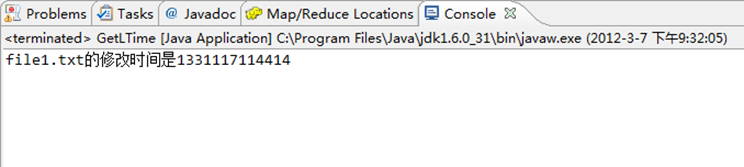
运行结果如图所示。

HDFS API详解

读取HDFS某个目录下的所有文件

通过"FileStatus.getPath()"可查看指定HDFS中某个目录下所有文件。具体实现如下:

1

2

3

4

5

6

7

8

9

10

11

12

13

14

15

16

17

18

19

20

21

22

package com.hebut.file;

import org.apache.hadoop.conf.Configuration;

import org.apache.hadoop.fs.FileStatus;

import org.apache.hadoop.fs.FileSystem;

import org.apache.hadoop.fs.Path;

public class ListAllFile {

public static void main(String[] args) throws Exception {

Configuration conf=new Configuration();

FileSystem hdfs=FileSystem.get(conf);

Path listf =new Path("/user/hadoop/test");

FileStatus stats[]=hdfs.listStatus(listf);

for(int i = 0; i < stats.length; ++i)

{

System.out.println(stats[i].getPath().toString());

}

hdfs.close();

}

}

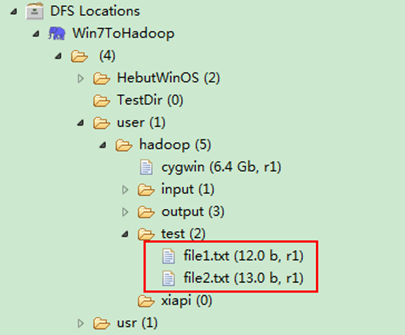
运行结果如图所示。

1)控制台结果

HDFS API详解

2)项目浏览器

HDFS API详解

查找某个文件在HDFS集群的位置

通过"FileSystem.getFileBlockLocation(FileStatus file,long start,long len)"可查找指定文件在HDFS集群上的位置,其中file为文件的完整路径,start和len来标识查找文件的路径。具体实现如下:

1

2

3

4

5

6

7

8

9

10

11

12

13

14

15

16

17

18

19

20

21

22

23

24

package com.hebut.file;

import org.apache.hadoop.conf.Configuration;

import org.apache.hadoop.fs.BlockLocation;

import org.apache.hadoop.fs.FileStatus;

import org.apache.hadoop.fs.FileSystem;

import org.apache.hadoop.fs.Path;

public class FileLoc {

public static void main(String[] args) throws Exception {

Configuration conf=new Configuration();

FileSystem hdfs=FileSystem.get(conf);

Path fpath=new Path("/user/hadoop/cygwin");

FileStatus filestatus = hdfs.getFileStatus(fpath);

BlockLocation[] blkLocations = hdfs.getFileBlockLocations(filestatus, 0, filestatus.getLen());

int blockLen = blkLocations.length;

for(int i=0;i

String[] hosts = blkLocations[i].getHosts();

System.out.println("block_"+i+"_location:"+hosts[0]);

}

}

}

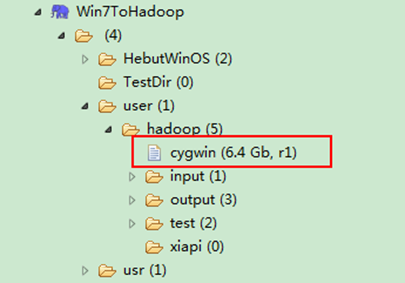
运行结果如图所示。

1)控制台结果

HDFS API详解

2)项目浏览器

HDFS API详解

获取HDFS集群上所有节点名称信息

通过"DatanodeInfo.getHostName()"可获取HDFS集群上的所有节点名称。具体实现如下:

1

2

3

4

5

6

7

8

9

10

11

12

13

14

15

16

17

18

19

20

21

package com.hebut.file;

import org.apache.hadoop.conf.Configuration;

import org.apache.hadoop.fs.FileSystem;

import org.apache.hadoop.hdfs.DistributedFileSystem;

import org.apache.hadoop.hdfs.protocol.DatanodeInfo;

public class GetList {

public static void main(String[] args) throws Exception {

Configuration conf=new Configuration();

FileSystem fs=FileSystem.get(conf);

DistributedFileSystem hdfs = (DistributedFileSystem)fs;

DatanodeInfo[] dataNodeStats = hdfs.getDataNodeStats();

for(int i=0;ilength;i++){

System.out.println("DataNode_"+i+"_Name:"+dataNodeStats[i].getHostName());

}

}

}

运行结果如图所示。

HDFS API详解

分享到 :
0 人收藏
您需要登录后才可以回帖 登录 | 立即注册

本版积分规则

积分:3875789
帖子:775174
精华:0
期权论坛 期权论坛
发布
内容

下载期权论坛手机APP